
Data residency is an operations problem, not only a legal one
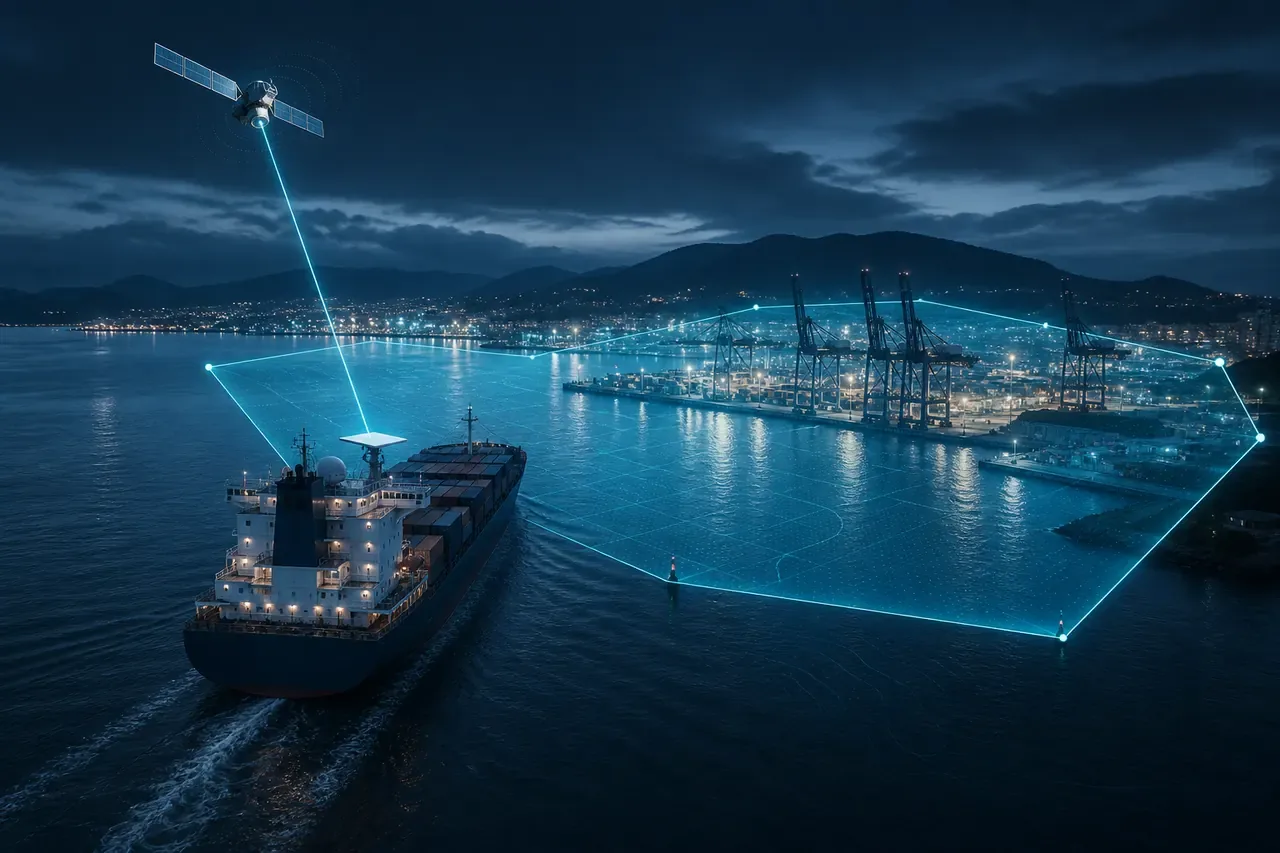
Maritime and logistics operators already deal with constrained uplinks, mixed vendor networks, and rules that change every time the hull meets a pier. In more ports every year (including China, Russia, Vietnam, Saudi Arabia, India, and Canadian calls where sovereignty, provincial, or charterer rules tighten the aperture), some operational data or telemetry simply cannot leave the territory while you are alongside. Sometimes that is statute. Sometimes it is contract.
So the observability question gets real fast: how do you keep Datadog useful for the voyage without breaking residency rules the moment the vessel is inside a controlled polygon?
We hear this from customers all the time. Legal, charterer, and critical-infrastructure expectations do not always line up with how cloud observability is built. A Datadog org in one region, Agents on a vessel that docks in another, Starlink pushing telemetry across borders. That mix is where residency risk shows up. SignalWeave designs for that world, not for a lab network that never changes flag state.
The useful part of the modern stack is that Starlink can expose GPS coordinates. Once those land in Datadog through SignalWeave, location becomes a signal you can act on: draw geofence polygons for sensitive ports or territorial waters, emit enter / exit events, and drive automation from those events. The hard part is picking the right maturity level for how Agents behave while the fence is active, and designing the return path so you do not melt the vessel network when every buffer drains at once.
Where residency and transfer pressure shows up
Dozens of jurisdictions now impose localization, residency, or conditioned cross-border transfer rules. For vessel ops, what matters is which ports your counsel and customers treat as controlled. Illustrative map only. Confirm scope and data types with legal counsel. This is not legal advice.
| Region / country | Typical pressure | Common anchors |
|---|---|---|
| China | Hard localization + exit assessments | CSL, DSL, PIPL (CII / important data) |
| Russia | Hard localization for citizen personal data | Federal Law 242-FZ |
| Vietnam | Local retention + outbound controls | Personal data / cybersecurity decrees |
| Saudi Arabia | In-country processing unless approved transfer | PDPL / SDAIA |
| India | Sectoral hard stops; transferable-by-default otherwise | DPDP negative-list model; RBI (payments) |
| Indonesia | Local handling for public / sensitive systems | GR 71 / PDP Law |
| Nigeria | Government and critical-infrastructure expectations | NDPA |
| South Korea, Turkey, UAE | Conditional / sector localization | Finance, health, government overlays |
| EU / EEA | Transfer restrictions (not blanket store-in-EU) | GDPR adequacy / SCCs / BCRs |
| Brazil | Adequacy-style cross-border rules | LGPD |
| Australia, Japan, Singapore | Transfer-with-safeguards + sector overlays | Privacy + finance/health/gov rules |
| Canada | Conservative port practice more than a federal telemetry ban | PIPEDA accountability; provincial public-sector/health; marine cyber / charterer policy |
Charter parties, navy/coast-guard contracts, cruise brands, and energy JVs often impose stricter "no SaaS egress in this EEZ" rules than the baseline statute. Geofencing is how you enforce that operational map (China/Russia hard stops, Vietnam/KSA/India caution, EU transfer mechanics, Canadian port conservatism, contract-driven zones) without surprising the NOC.
What geofencing looks like with Starlink + Datadog
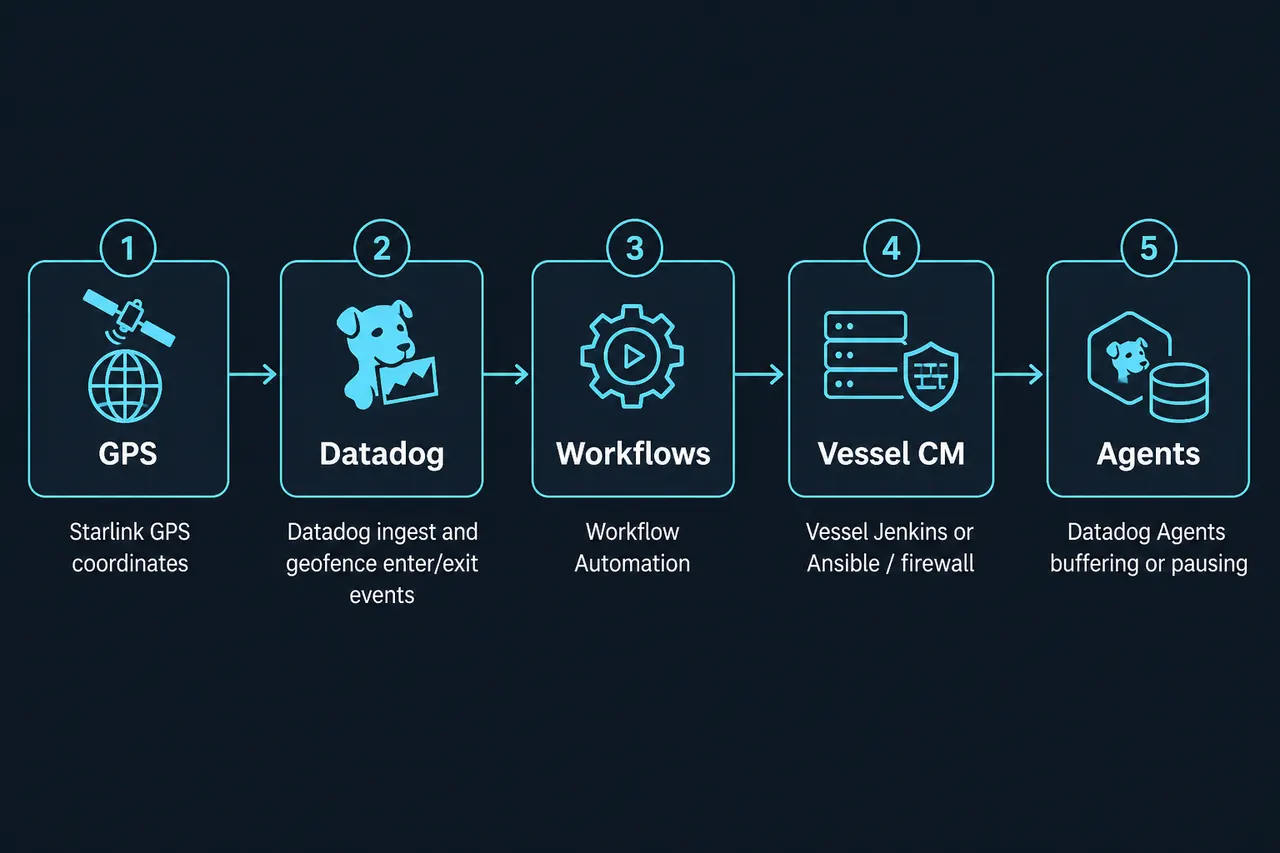
At a high level the control plane is:
- Ingest position. SignalWeave ships Starlink location (and related terminal health) into Datadog as metrics/events your monitors and workflows can evaluate.
- Define polygons. Port approaches, territorial baselines, or custom "within X miles of this quadrant" zones that legal and network teams agree on.
- Emit enter / exit events. Crossing the fence becomes an actionable Datadog event (or monitor transition), not a manual ticket.
- Trigger Workflow Automation. While the vessel still has connectivity to Datadog SaaS, a workflow can call the endpoint you trust: vessel Jenkins, Ansible / config-management API, firewall orchestrator, or Fleet Automation to reconfigure Agents. Workflows can run from monitors, schedules, or manually. HTTP actions can hit on-vessel tooling.
- Schedule Datadog Downtime for the vessel. The same enter workflow should create a scoped Downtime (by `vessel`, `voyage_id`, or host/group tags) so monitors do not page the NOC / ITOC for an intentional blackout. Cancel or expire that Downtime on a clean exit / reopen via the UI or Downtimes API. Downtimes silence notifications. They do not freeze monitor state transitions.
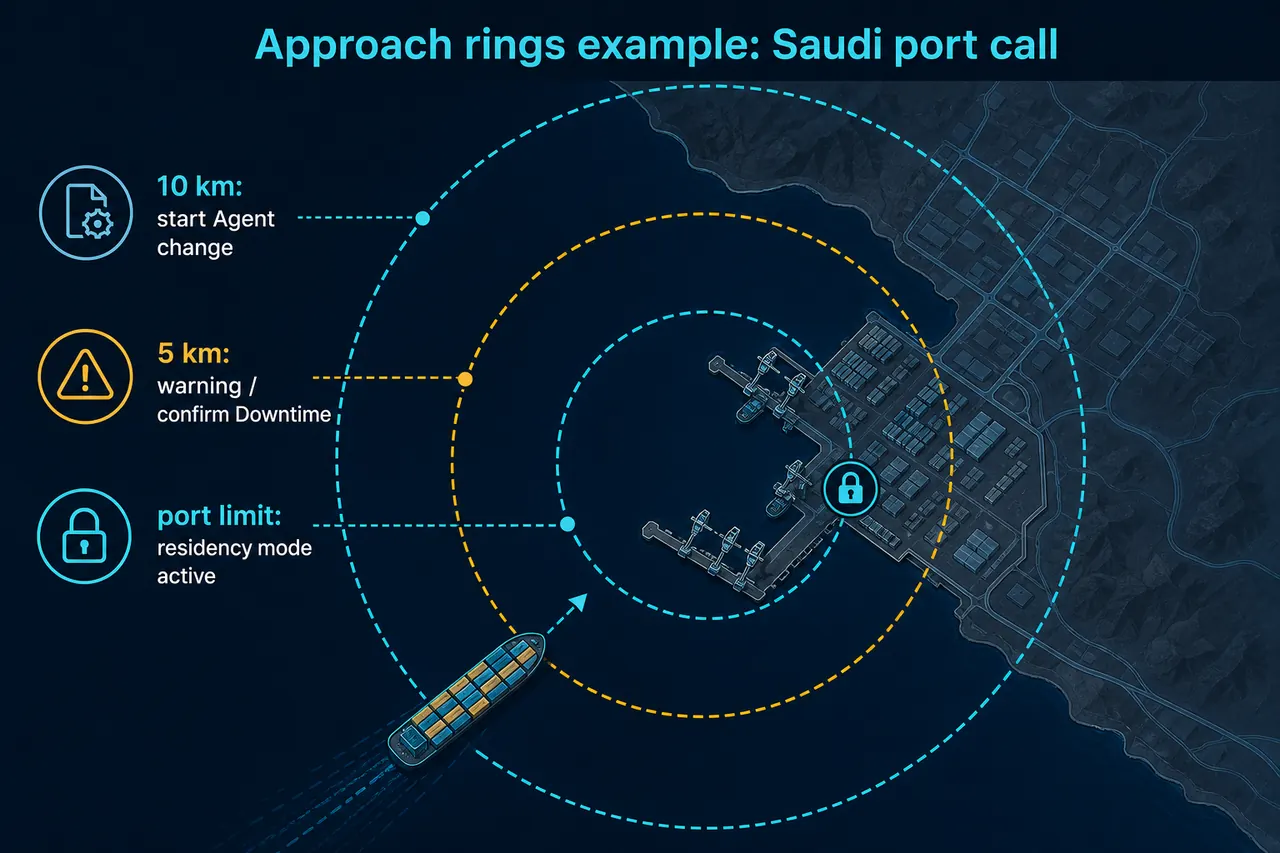
Polygons do not have to be a single hard line at the pier. Most fleets use approach rings so Agent and firewall changes finish while SaaS is still reachable. Example for a Saudi port call (distances are illustrative; set them with legal and network ops):
| Distance to zone | Example action |
|---|---|
| ~10 km out | Start Agent / CM changes (pause or buffer profile, journey tags). Confirm Fleet Automation or local playbook is running while Datadog is still reachable. |
| ~5 km out | Warning to NOC / ITOC. Confirm vessel-scoped Downtime is scheduled. Abort path if change failed. |
| Port limit / alongside | Residency mode fully active (Level 1, 2, or 3). No further dependency on SaaS for the safety control. |
Mirror the rings on departure so reopen and Downtime clear happen in sequence, not as a single cliff at the breakwater.
Timing matters in both directions:
- Entering a restricted zone can often be handled while you are still connected to Datadog. The cloud workflow fires, Agents and firewalls move into restricted mode, journey tags update, and Downtime is scheduled before or as you cross the line.
- Leaving and restoring egress often cannot rely on Datadog SaaS alone. If ports to Datadog are already closed, the "open again and in what order" logic has to live offline on the vessel: a local event bus, automation runner, or network controller that watches the same geofence (or a vessel GPS feed) and sequences recovery. Once SaaS is reachable again, a follow-up workflow clears Downtime and stamps the journey stop as complete.
Datadog is strong on the connected half of the loop. The disconnected half is on the vessel (with partners like SignalWeave helping design it).
Journey tags so NOC and ITOC see the blackout
Stopping telemetry is only half the story. Tag the voyage as a sequence of stops so Datadog (and humans) interpret silence correctly. Apply via Agent config, host tags, or events when the geofence enter/exit fires.
| Tag | Example values | Purpose |
|---|---|---|
| `voyage_id` | `ATL-2026-0912` | Sailing / rotation ID shared with the ops calendar |
| `journey_phase` | `underway`, `approach`, `alongside`, `departure`, `international` | Where the vessel is in the call |
| `residency_mode` | `normal`, `level1_pause`, `level2_buffer`, `level3_policy` | Which control posture is active |
| `residency_zone` | `ca-halifax`, `cn-shanghai` | Legal-approved port / polygon label |
| `vessel` / `fleet` | `example-ship`, `atlantic-fleet` | Same keys as your maritime tagging playbook |
| Action | On enter (approach / alongside) | On exit (departure) |
|---|---|---|
| Journey tags | Set `journey_phase:alongside`, `residency_mode`, `residency_zone`, `voyage_id` | Return `journey_phase` to `underway` or `international`; clear residency mode |
| NOC event | Post Vessel X entered Zone Y, Level N | Post Vessel X cleared Zone Y, residency complete |
| Downtime | Schedule vessel-scoped Downtime | Cancel or expire Downtime after reopen / backfill |
| Dashboards | Filter by `vessel` + `residency_zone` so blackout is visible as policy, not outage | Confirm catch-up or gap window, then resume normal fleet view |
NOC / ITOC get dashboards that show why a vessel went dark, filterable blackout windows, and Downtime scoped to one vessel instead of the whole fleet. Use Downtime at every maturity level. Closing the firewall without it is how you get false pages at 02:00.
Maturity levels for vessel observability under residency constraints
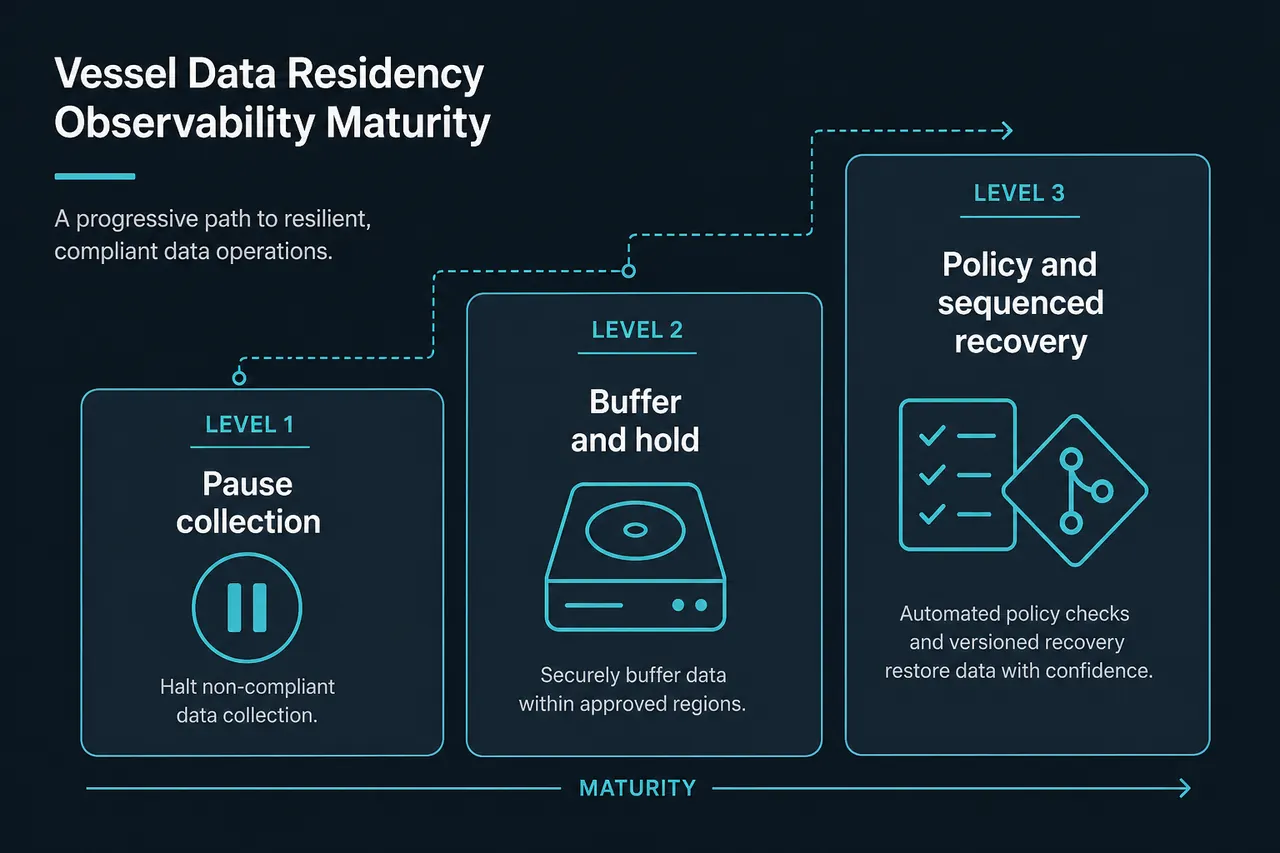
Treat this as a ladder. Start where risk, storage, and ops maturity allow, then graduate. At every level, pair the technical control with journey tags and vessel-scoped Downtime.
Level 1: Pause collection (simplest start)
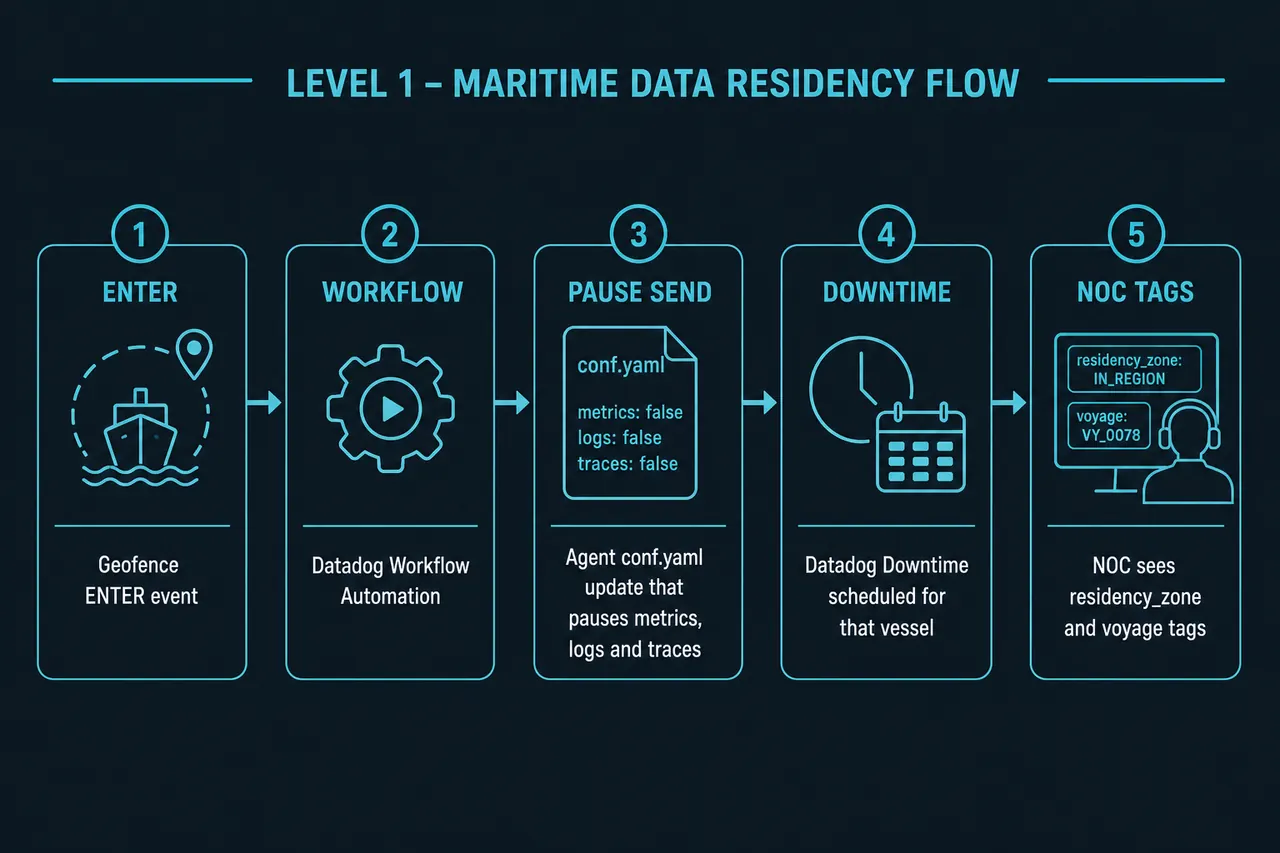
If you do not need to retain metrics, logs, and traces while alongside in the restricted polygon, treat residency as a configuration change rather than a buffering problem.
When the enter event fires, Datadog Workflow Automation (or Fleet Automation) should do three things together:
- Update Agent configuration so metrics, logs, and APM/traces stop being sent. Usually that means adjusting the relevant sections of `datadog.yaml` / integration configs and restarting or hot-reloading where your process allows.
- Apply journey tags (`journey_phase:alongside`, `residency_mode:level1_pause`, `residency_zone`, `voyage_id`) via Agent config or the host tags API.
- Create Datadog Downtime scoped to that vessel (and its monitor groups) for the planned alongside window, or until the exit workflow cancels it (Downtimes API).
Why teams start here
- No Agent disk pressure from long buffer windows
- No "everyone flushes at once" bandwidth spike when you leave port
- Clear audit story: collection was disabled inside the zone
- NOC / ITOC are not paged for an intentional blackout
Trade-off
- You accept a gap in Datadog history for the alongside window. Fine for many early programs. Harder if you need incident forensics or continuous compliance evidence for that window.
This is the right first maturity level for most fleets standing up residency controls.
Level 2: Block egress and buffer on the Agent
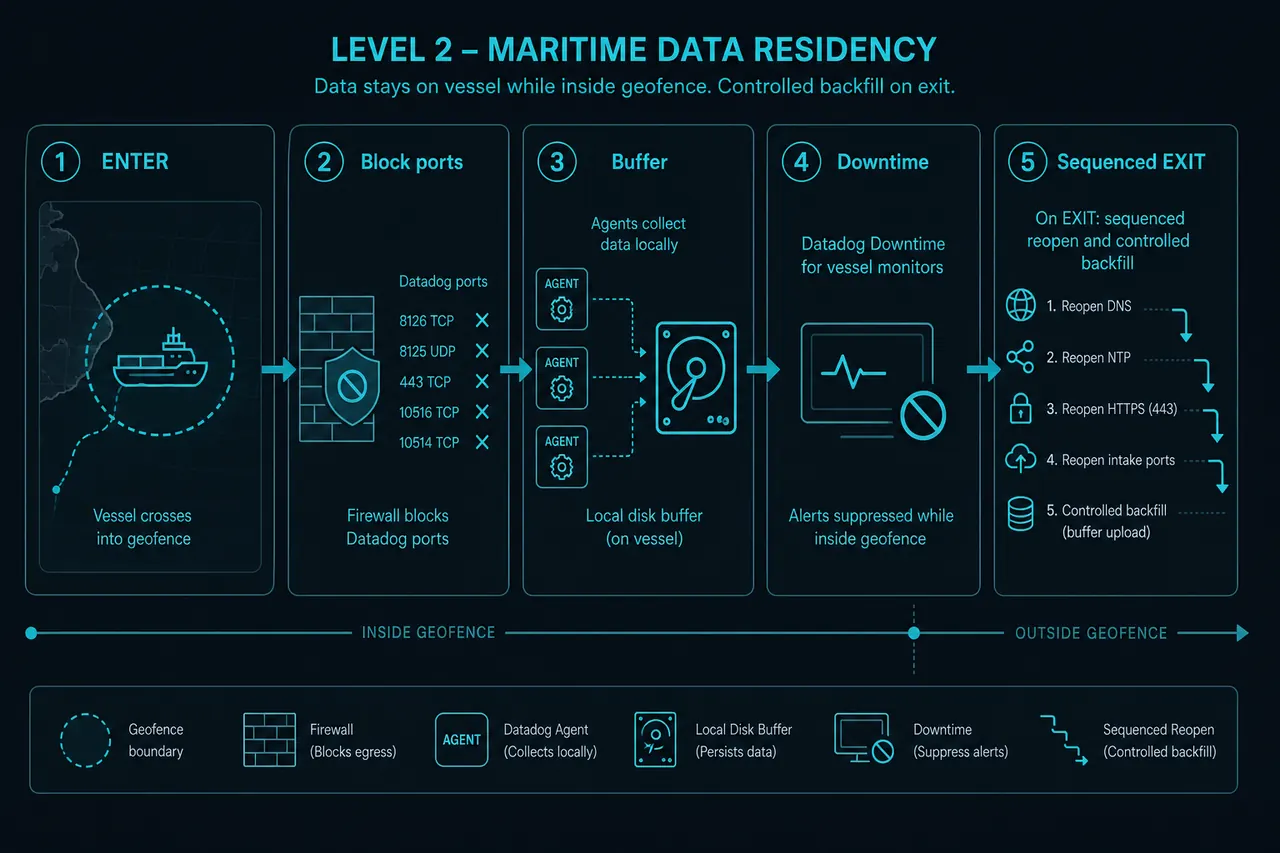
When retention alongside does matter (continuous performance baselines, security telemetry, or contractual "no blind spots"), you keep collecting locally but deny the network path from vessel Agents to Datadog intake (metrics, logs, traces). Agents then rely on Datadog’s retry and buffering logic until ports reopen and backfill can run.
Plan capacity per telemetry type. Datadog’s docs are specific here:
- Metrics. Failed sends go to an in-memory retry queue first (`forwarder_retry_queue_payloads_max_size`, default around ~15 MB). Optional on-disk buffering (Agent v7.27+) is enabled by setting `forwarder_storage_max_size_in_bytes` to a positive value. See data buffering. Disk is only used while total disk usage stays under `forwarder_storage_max_disk_ratio` (default 0.8). Restarts drop in-memory payloads but preserve on-disk transactions.
- Logs. The Logs Agent applies backpressure (stops reading sources and resumes from registry offsets). It does not use the metrics on-disk forwarder queue. Long dark windows still need disk/retention planning on the host log path.
- APM / traces. Mostly in-memory. Payloads are dropped when queues fill. Do not assume multi-day trace retention on the Agent during a residency hold.
The enter workflow still:
- Blocks or redirects egress to Datadog intake
- Confirms Agents have adequate buffer settings for the call (enable and size on-disk metrics buffering before you lose SaaS connectivity)
- Tags the journey stop (`residency_mode:level2_buffer`)
- Schedules vessel-scoped Downtime so SaaS silence does not look like a production outage while data is held locally
Done right, you keep metrics without violating residency. You also inherit two operational risks you have to design for on purpose.
Concern A: Buffer storage vs time in port
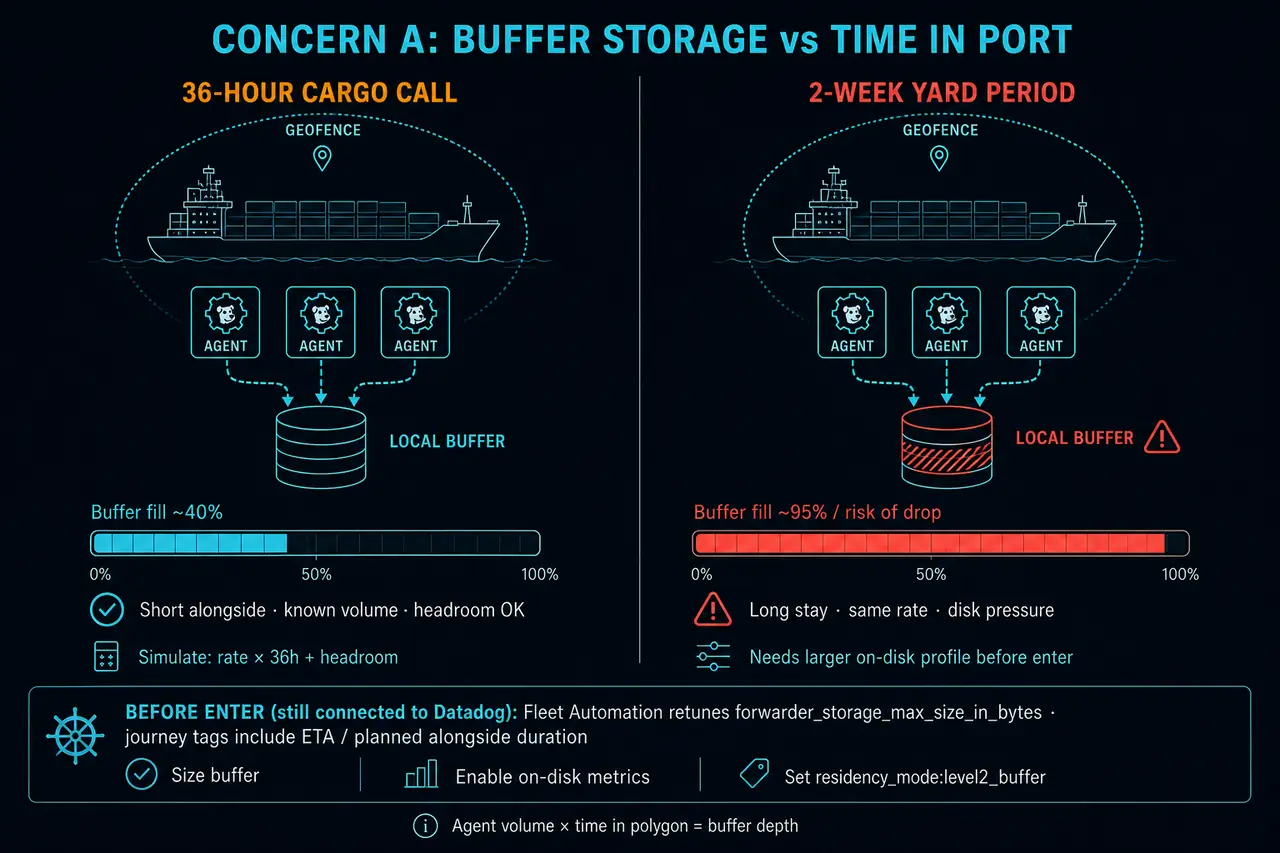
Buffer depth depends on:
- How many Agents and integrations are writing
- Metric / log / trace volume per interval
- How long the vessel will remain inside the polygon
A 36-hour cargo call and a two-week yard period are different storage problems. Before you enable Level 2 in production, simulate capacity. Use known Agent volume (SignalWeave’s payload simulator helps model Starlink-related collection; apply the same discipline to the rest of the vessel’s Datadog footprint) and multiply by worst-case alongside duration with headroom.
If a longer stay is forecast, Datadog Fleet Automation can remotely retune Agent buffer / disk settings before you lose SaaS connectivity, increasing hold capacity for that voyage window. Waiting until you are already dark to Datadog is too late for cloud-driven reconfiguration. Journey tags that include ETA / planned alongside duration help automation pick the right buffer profile before enter.
Concern B: The exit stampede
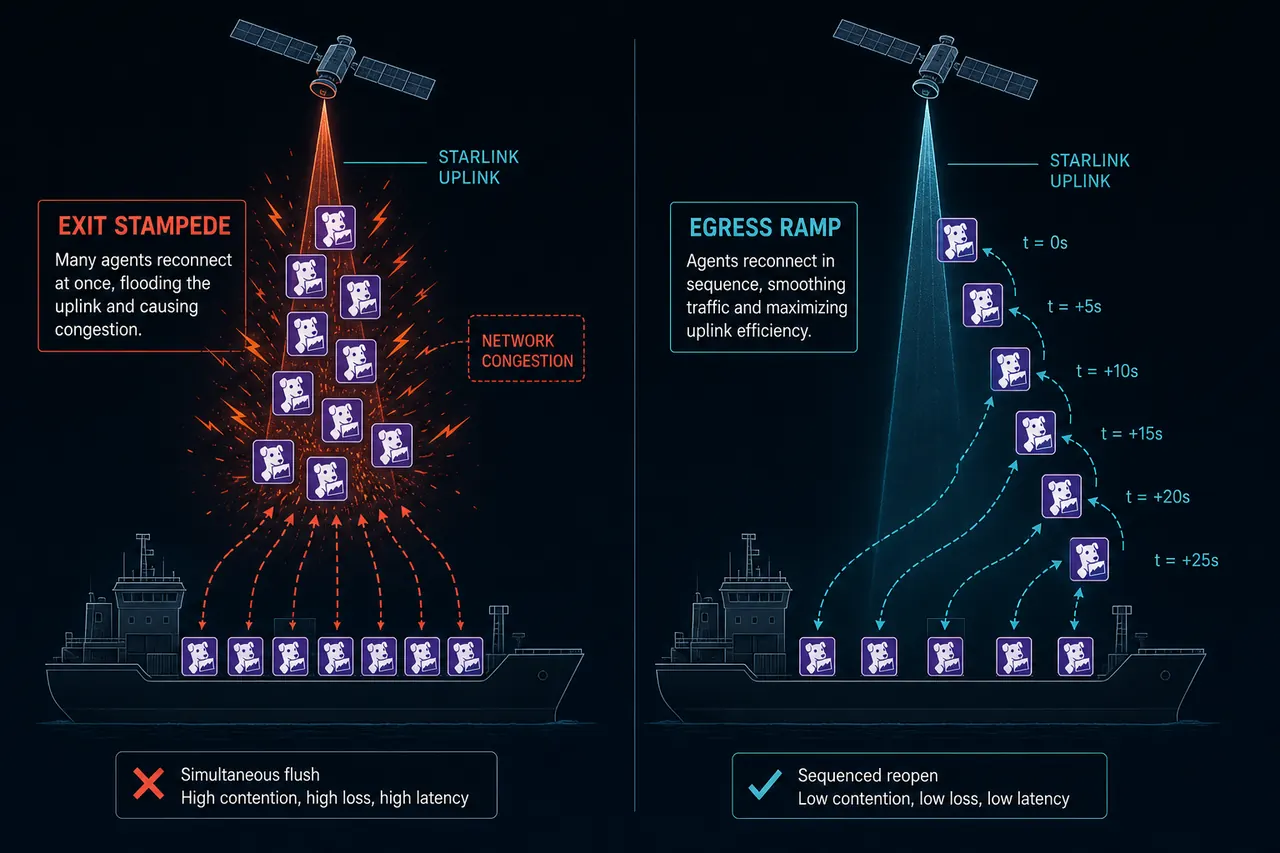
When the vessel clears restricted waters and ports to Datadog reopen, every buffered Agent will try to catch up. On a bandwidth-constrained Starlink or hybrid vessel network, that simultaneous backfill can starve guest Wi-Fi, ECDIS support paths, or other critical flows.
You need an egress ramp: open Datadog-related ports (or re-enable senders) in a sequence (by subnet, Agent role, or priority class) so outbound traffic stays inside a budget. That sequencing is almost always a local orchestration problem. The vessel automation that saw the exit event has to own the order and pacing. Datadog Workflow Automation can still define the policy and push playbooks (including HTTP calls to on-vessel CM) while connected. The runtime that executes the reopen ladder has to survive the dark period. When connectivity returns, Agents retry newest in-memory payloads before on-disk backfill (retry order). Another reason to ramp instead of opening everything at once.
After SaaS connectivity returns and backfill is under control, cancel the vessel Downtime (or let a time-boxed Downtime expire) and stamp `journey_phase` / `residency_mode` back to normal so ITOC knows the blackout window is closed.
Level 3: Coordinated policy (geofence + IaC + local recovery)
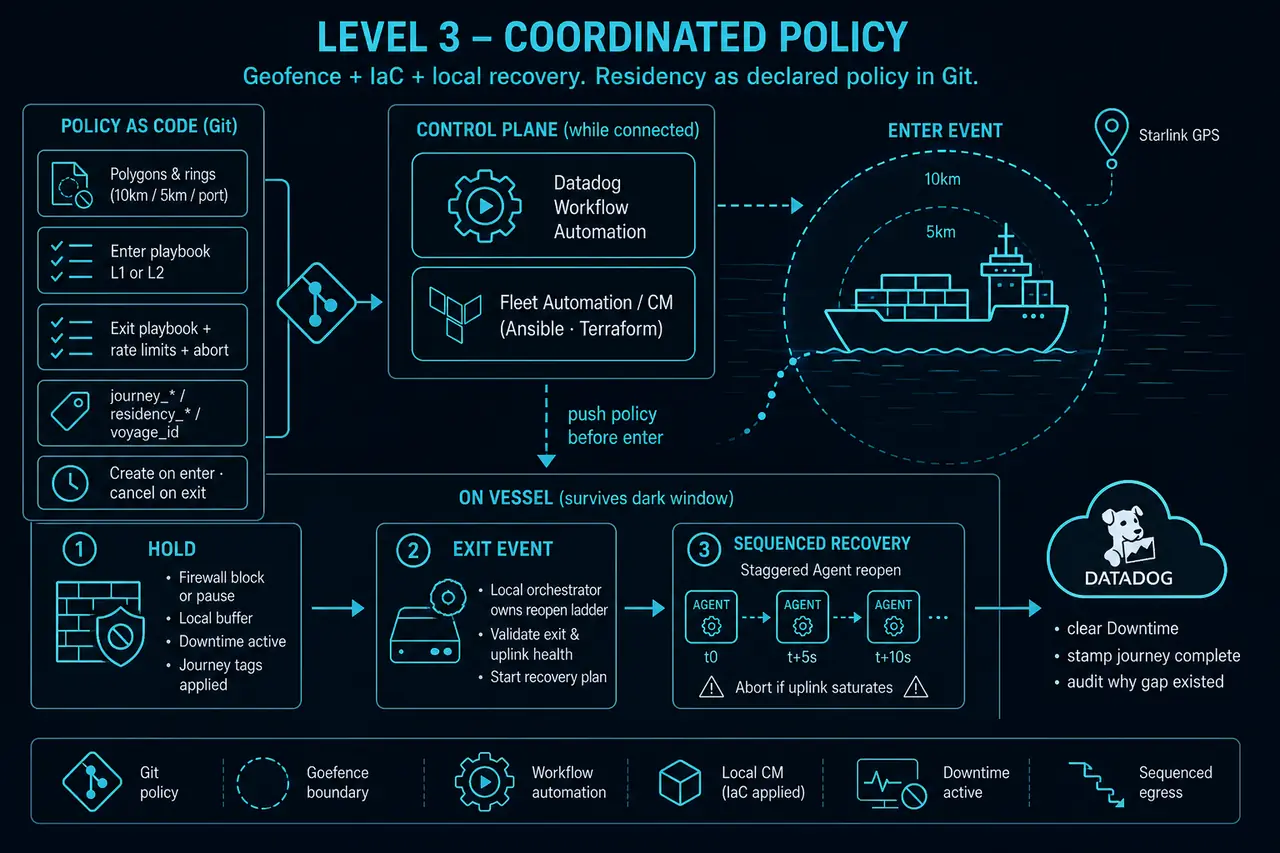
Mature programs treat residency as a declared policy versioned in Git:
- Polygon definitions and "within X miles" rules reviewed by legal / compliance
- Enter playbooks (Level 1 disable vs Level 2 block-and-buffer) as Ansible / Terraform / your CM tool of record
- Exit playbooks with explicit Agent order, rate limits, and abort conditions if uplink saturates
- Journey tag schema for start, stops, and finish of each voyage, visible to NOC / ITOC dashboards
- Downtime API / Workflow steps as first-class actions on enter and exit (not a manual afterthought)
- Tags that make the zone visible in Datadog later (`residency_zone`, `vessel`, `voyage_id`) so dashboards show why a gap or backfill window exists
SignalWeave’s tagging strategy and config generator help maritime fleets encode vessel / fleet / region context before the first geofence ever fires. IaC patterns keep Agent changes reviewable instead of one-off SSH edits at the pier.
Reference control loop
- Approach (Datadog connected). Geofence enter → Workflow Automation → CM / firewall / Fleet Automation → journey tags → vessel Downtime.
- Alongside (vessel local). Hold Level 1 (no send) or Level 2 (buffer). Do not depend on SaaS for safety controls. Downtime keeps pages quiet.
- Departure (vessel local). Exit event → sequenced reopen / re-enable → controlled backfill.
- After action (Datadog). Clear Downtime, stamp journey stop complete, review the gap or catch-up window, tune polygons and volumes for the next call.
Starlink GPS gives you a clean trigger. Policy, journey tags, Downtime, and the exit ramp are what make it operable for the NOC.
Logistics beyond maritime
The same pattern applies wherever mobile assets cross residency boundaries: cross-border trucking yards, rail terminals, and staging areas that inherit national data rules. If you can trust a location signal into Datadog, you can attach a fence. If you cannot trust SaaS during the restricted window, you need a local half of the loop plus Downtime so monitors stay honest.
Datadog documentation
| Topic | Doc |
|---|---|
| Workflow Automation | docs.datadoghq.com/actions/workflows |
| Getting started with workflows | docs.datadoghq.com/getting_started/workflow_automation |
| Agent retry and buffering (metrics, logs, APM, processes) | docs.datadoghq.com/agent/guide/agent-retry |
| On-disk metrics buffering settings | docs.datadoghq.com/agent/configuration/network/#data-buffering |
| Monitor downtimes | docs.datadoghq.com/monitors/downtimes |
| Downtimes API | docs.datadoghq.com/api/latest/downtimes |
| Fleet Automation | docs.datadoghq.com/agent/fleet_automation |
| Configure Agents at scale | docs.datadoghq.com/agent/fleet_automation/configure_agents |
| Host tags API | docs.datadoghq.com/api/latest/tags |
| Events API | docs.datadoghq.com/api/latest/events |
How SignalWeave helps
Residency geofencing is not a generic monitoring feature. It sits where Starlink fleet operations, enterprise Datadog practice, and voyage-specific policy meet. That is the work SignalWeave does with customers.
| What you get | Why it matters |
|---|---|
| Starlink industry depth | Terminal telemetry, obstruction, bandwidth budgets, multi-dish vessels. Not abstract "satellite connectivity." |
| Enterprise observability craft | Official Datadog Technology Partner patterns: Agent checks, tags, Workflow Automation, Fleet Automation, Downtime, and NOC-ready dashboards. |
| Bespoke residency designs | Level 1 to 3 playbooks mapped to your polygons, charterer rules, buffer capacity, and egress ramps. Not a one-size checkbox. |
| Product and codebase flexibility | The SignalWeave Starlink integration and tooling keep evolving with customer needs. Metric groups, tagging, config generation, and automation hooks can be extended when your residency or voyage model demands it. |
You keep one Datadog pane of glass for the voyage. We help you stay compliant when you hit a sovereign pier, and stay operable when you leave.
Planning residency controls, or already hitting ports where telemetry cannot leave? or contact us. Bring polygons, voyage profiles, and NOC constraints. We will design the Starlink to Datadog control loop your crews can actually run.
SignalWeave is the official Datadog Technology Partner for Starlink fleet observability. This article describes architectural patterns and a high-level survey of residency / transfer pressure as of publication. It is not legal advice. Laws, sectoral circulars, and enforcement practice change. Your counsel owns final interpretation for each flag state, port, data category, and contract.
Next step
Put Starlink telemetry in Datadog
Official Datadog Technology Partner. Request integration access or talk to our team about rolling out fleet observability across your Starlink deployment.